The problem
Every valuation report is a multi-page PDF. To bill insurers, someone had to open each one and copy five details into a monthly Excel schedule: inspection date, insurer, registration, policy number and report reference. Then work out the valuation type and the fee, and check that no report had been entered twice.
It was slow, easy to get wrong, and the documents are highly confidential, so sending them to an online service was not an option.
The solution
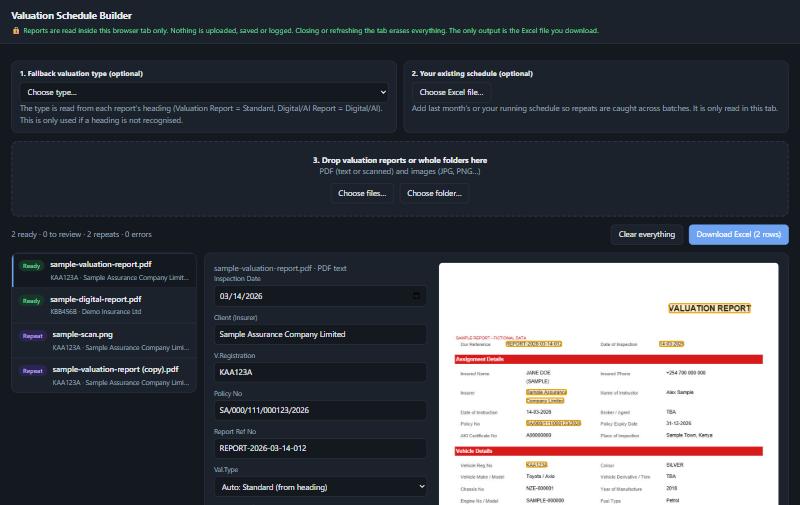
Drop a report, a whole folder, or a scan into the page. The tool reads it, fills in the row, works out the fee, warns about anything doubtful, and produces a ready-to-use Excel file that matches the firm's existing template. Nothing else from the report leaves the page.
How it works
- Drop in reportsPDFs, scanned PDFs, photos or entire folders. Digital PDFs are read directly; scans go through OCR.
- Each value is found by its labelThe reader locates a label such as "Policy No" and takes the text beside it, including wrapped lines, so a value always belongs to its own label, whatever order the PDF stores its text in.
- Type and fee come from the report heading"Valuation Report" is Standard (1,000). "Digital Report" or "AI Report" is Digital/AI (900). Nothing to select by hand.
- Checks run automaticallyCross-checks, repeat detection and OCR safeguards (below) decide whether a row is Ready or needs a human look.
- Download the Excel scheduleOnly clean rows are exported, in the firm's own column layout with the Month and lookup formulas intact.
Built for accuracy
Cross-checks
The inspection date is compared with the date embedded in the report reference and with photo timestamps. The registration is compared with the file name. Any mismatch is flagged.
Repeat detection
Catches the same file, the same report reference, or the same vehicle, policy and date, within a batch and against an existing schedule the user attaches.
Human in the loop for scans
OCR can misread characters, so every scanned field is flagged and must be confirmed against the page image before it is exported.
Confidentiality by design
Runs entirely in the browser
There is no server, database or upload. The PDF reader, OCR engine and Excel writer are bundled with the tool and run locally.
Locked to its own origin
A strict Content-Security-Policy stops the page sending data anywhere else. It was tested with zero blocked or attempted outside requests.
Nothing is stored
No cookies, local storage or caches. Closing the tab erases everything, and it wipes itself after 30 minutes of inactivity.
One output
The only thing that leaves is the Excel file the user chooses to download, containing just the schedule columns.
Results
Measured in a browser test on a laptop. Reading a batch does not freeze the page; page previews load only when a file is opened.
Try it with sample data
All files below are fictional and created for this demonstration. No real client, vehicle or policy is shown.
| Sample file | What it shows |
|---|---|
| sample-valuation-report.pdf | A "Valuation Report": read as Standard, 1,000 |
| sample-digital-report.pdf | A "Digital Report": read as Digital/AI, 900 |
| sample-output.xlsx | The Excel schedule the tool produces from those two reports |
Under the hood
It is delivered as a small folder that runs on the user's own machine (or on a private page), with no installation and no accounts.